1
Update
Phones, browsers, computers, routers, TVs, cameras and tablets. If it has firmware, it gets a seat at the table.
Routers, phones, passwords, smart TVs, school apps, AI tools, cloud accounts and mystery devices nobody remembers buying — CyberSafe@Home helps families make better choices before the bad half hour arrives.


“You probably are not the target. Your access, relationships, devices or information may be.”
Focus on the access and relationships attackers can abuse. Keep the advice practical, calm and specific enough to act on before something goes wrong.
Start here
The goal is not perfect security. The goal is to remove the easy paths that criminals, stalkers, nuisance actors and opportunistic malware actually use.
Phones, browsers, computers, routers, TVs, cameras and tablets. If it has firmware, it gets a seat at the table.
Unique passwords, one protected password manager, and a recovery plan that does not live only in your head.
Put passkeys on trusted phones, security keys or device biometrics where supported.
Security keys and passkeys first, authenticator apps next, SMS only if there is no better option.
Supported firmware, WPS off, remote admin off, default admin password gone, old port forwards removed.
WPA2/WPA3, a real passphrase, guest Wi‑Fi for visitors and cheap devices.
Backup codes, password-manager recovery, telco account protection and a tested file restore.
Keep browsers and dev machines boring. No mystery extensions, one-line install scripts, random package runners or cracked tools.
Drafting is fine. Sending, buying, deleting, submitting and changing access needs a human.
The household rule is simple: if a control blocks something, ask. Do not teach bypass culture.
Guide cards
Start with the quick version, then open the detail for actions, checks, mistakes to avoid and evidence links.

A home router is an internet-facing computer that also happens to make Netflix work. Treat it like infrastructure, not furniture.
Fast take
Buy supported, keep it patched, turn off dangerous convenience features, and replace it when support dies.
Why it matters
Routers sit between the household and the internet. They are always on, rarely checked, and useful to attackers because compromising one device can give them persistence, traffic visibility or a launch point into someone else's network. State-backed campaigns and botnets have both abused small office and home office gear. That is not theoretical cyber fog. It happened.
Do this
Check
Avoid
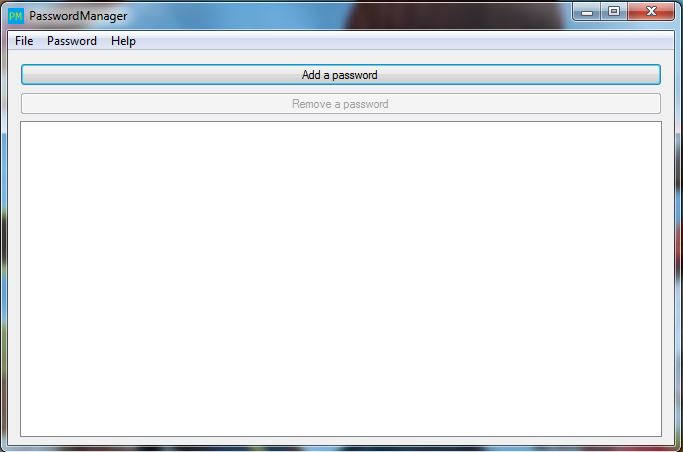
The household does not need clever passwords. It needs unique passwords, passkeys where available, MFA, and a way back in when a phone dies.
Fast take
Password manager first. Passkeys and security keys for the accounts that matter. Recovery sorted before the bad day.
Why it matters
Password reuse turns one breached forum, shop or abandoned service into a path toward email, banking, social media and work-adjacent accounts. MFA reduces that blast radius. Passkeys reduce phishing risk again, but only if recovery is not a single phone and a prayer.
Do this
Check
Avoid

A VPN is not a privacy spell. A browser extension is not a sticker. A cracked app is not a bargain if it brings malware to the machine that also does tax, banking or work.
Fast take
Install less. Trust fewer vendors. Keep sensitive devices boring.
Why it matters
These tools sit directly in the path of browsing, credentials and device trust. Some ask for broad permissions because they need them. Some ask because broad access is the business model. The average household cannot audit extension code or VPN routing. So the practical answer is boring: fewer tools, better sources, less blind trust.
Do this
Check
Avoid


Smart TVs, cameras, printers, school devices, work laptops and AI tools all share the same domestic blast radius unless you deliberately separate the risk.
Fast take
Keep sensors and cheap devices away from sensitive work. Keep work data out of personal clouds and random AI tools. Put approval gates around agents.
Why it matters
Home devices now include microphones, cameras, cloud accounts, printers, school portals, work VPNs and AI assistants that can browse and click. Most people are not being personally hunted by elite operators. Their access can still be useful, and the home network is often where personal convenience quietly meets business risk.
Do this
Check
Avoid


Home developers and tinkerers run package managers on machines full of real accounts, browser sessions, SSH keys and family data. npm, pnpm, Bun, pip and friends can execute code during install.
Fast take
Treat package installs and one-line setup commands as code execution. Isolate experiments before they touch the laptop you use for work, banking and actual life.
Why it matters
The Cortana package-management work made the key point: dependency install is not a passive download. Package managers support lifecycle scripts and helper executors that can run code quickly, often before anyone has reviewed what changed. On a home machine, that code may sit beside browser cookies, cloud sync, SSH keys, password-manager sessions and personal documents.
Do this
Check
Avoid


Social profiles, comments, photos, usernames and tiny repeated details can be stitched into a useful profile of a person. The risk is not one post. It is correlation.
Fast take
Do not hand the internet a neat filing cabinet about your life. Lock down what should be private, split audiences, and remove old location, family and recovery-question clues.
Why it matters
A motivated stranger does not need a breach to learn useful things. LinkedIn can reveal work context. Instagram can reveal family and routines. Facebook can reveal relatives and old tags. Reddit or X can reveal interests, writing style and timing. Joined together, that becomes targeting material for scams, harassment, impersonation or account recovery attacks.
Do this
Check
Avoid


Security is not only prevention. It is knowing how to get back in, preserve evidence and stop a bad moment becoming a month-long admin disaster.
Fast take
Protect email, phone number, backup codes, password-manager recovery and backups. Test one restore before it matters.
Why it matters
Recovery is where tidy advice either works or falls apart. If email, phone number, password manager and backup codes all depend on the same lost device, the household has a single point of failure wearing a phone case.
Do this
Check
Avoid
Product guidance
Examples and selection principles, not procurement advice. Current, supported, patched, configured and understandable beats brand loyalty.
Good family password manager examples with strong security models and usable recovery options.
Best fit for email, banking, identity, password manager and high-value admin accounts.
The boring safe answer for most households. Current, supported and configured beats brand loyalty.
Excellent when maintained. Overkill when nobody reads alerts or remembers why rules exist.
Useful for specific reasons, not a privacy spell. Pick reputable providers and avoid free proxy/unblocker tools.
Apple Screen Time, Google Family Link, Microsoft Family Safety, Quad9/NextDNS-style filtering can help when rules are explained and reviewed.
Unsupported firmware and unknown provenance are the risk. Government scrutiny is a risk signal, not proof.
Cheap fun until it becomes credential theft, malware or an awkward conversation with IT.
Especially around money, tax, legal, medical, school, work or family data.
All these bad things really happened
Use these as the sober reality check. Not doom. Just evidence that home gear, passwords, extensions, IoT and agents are not imaginary risk categories.
Source mix
Swipe source types
Threat receipts
Swipe one receipt at a time
Detailed guidance
Each section gives the actions, checks, common mistakes and evidence needed to improve one part of household security.

A home router is an internet-facing computer that also happens to make Netflix work. Treat it like infrastructure, not furniture.
Short version
Buy supported, keep it patched, turn off dangerous convenience features, and replace it when support dies.
Do this
Check
Avoid
More detail
The household does not need clever passwords. It needs unique passwords, passkeys where available, MFA, and a way back in when a phone dies.
Short version
Password manager first. Passkeys and security keys for the accounts that matter. Recovery sorted before the bad day.
Do this
Check
Avoid
More detail
A VPN is not a privacy spell. A browser extension is not a sticker. A cracked app is not a bargain if it brings malware to the machine that also does tax, banking or work.
Short version
Install less. Trust fewer vendors. Keep sensitive devices boring.
Do this
Check
Avoid
More detail
Smart TVs, cameras, printers, school devices, work laptops and AI tools all share the same domestic blast radius unless you deliberately separate the risk.
Short version
Keep sensors and cheap devices away from sensitive work. Keep work data out of personal clouds and random AI tools. Put approval gates around agents.
Do this
Check
Avoid
More detail
Home developers and tinkerers run package managers on machines full of real accounts, browser sessions, SSH keys and family data. npm, pnpm, Bun, pip and friends can execute code during install.
Short version
Treat package installs and one-line setup commands as code execution. Isolate experiments before they touch the laptop you use for work, banking and actual life.
Do this
Check
Avoid
More detail


Social profiles, comments, photos, usernames and tiny repeated details can be stitched into a useful profile of a person. The risk is not one post. It is correlation.
Short version
Do not hand the internet a neat filing cabinet about your life. Lock down what should be private, split audiences, and remove old location, family and recovery-question clues.
Do this
Check
Avoid
More detail
Security is not only prevention. It is knowing how to get back in, preserve evidence and stop a bad moment becoming a month-long admin disaster.
Short version
Protect email, phone number, backup codes, password-manager recovery and backups. Test one restore before it matters.
Do this
Check
Avoid
More detail
Scenarios
Short, concrete scenarios help families reason through trade-offs without turning every decision into a lecture on packet filtering.
A teenager installs a free VPN to get around a game-region block. A week later the home IP is buried in CAPTCHAs and a bank login gets challenged.
Good response
The router still works, so nobody has touched it for five years. Remote admin is on, UPnP is on, and nobody knows the admin password.
Good response
An AI browser agent offers to compare bills, log in, fill a form and submit the result. It looks efficient. It is also about to act as you.
Good response
Close
Give people a way to leave the session and improve their household without needing a weekend, a lab rack or a personality transplant.
Update phone and browser. Turn on MFA for personal email. Remove one extension you do not trust. Screenshot router model and firmware version.
Put important accounts into a password manager. Check router firmware, admin settings, guest Wi‑Fi, port forwards and backup codes.
Review smart devices, old routers, family bypass rules, telco controls, backups, work/home boundaries and AI-agent approval gates.
More detail
Each major category has a focused page with practical checks, examples and source links.
Interactive network topology for firmware, WPS, remote admin and guest Wi‑Fi.
Open page →Account takeover path model for password reuse, passkeys, MFA and recovery.
Open page →Device shelf for OS/browser updates, app trust and extension permissions.
Open page →Trust-shift route map for VPNs, residential proxies and bypass culture.
Open page →Scenario-led household ruleboard for bypass culture and work-device boundaries.
Open page →Sensor-room map for cameras, speakers, printers, TVs and IoT placement.
Open page →Split-lane model for work files, personal cloud, printers and accidental mixing.
Open page →Approval-gate model for draft, send, submit, delete, buy and admin actions.
Open page →Supply-chain model for npm postinstall scripts, package runners and dev-machine isolation.
Open page →Incident timeline for telco controls, backup codes, clean resets and evidence capture.
Open page →Dossier graph showing how social platforms, photos, handles and public details get joined.
Open page →Decision matrix for examples, caution categories and avoid patterns.
Open page →Selected source links and image notes
Source chips show the type and host before you open them, so the footer works as a quick evidence library rather than a bag of anonymous links.
Source library
Swipe one source at a time
Product names are examples, not endorsements or procurement recommendations. Real-world images are contextual visual references from Wikimedia Commons thumbnails and credited in-place. Headline cards link to the original public guidance/advisory sources.